It never touches LinkedIn on your behalf.
Know who's worth your time.
Open any LinkedIn profile and Lyncera tells you whether this person is worth an hour — and writes the message if they are. No automation, no spam: you stay in control.
14 days free. No credit card. Nothing is deleted when it ends.
Specifications, not performance claims
Every number a prospecting tool usually puts here is a number it cannot measure. So these are facts about the software instead — and each one is checked against the code by a test.
- LinkedIn industries mapped
- 135
- Named in every language below, so a German page fills a Finnish workspace in Finnish.
- Points in a fit score
- 100
- Six components: 30 + 20 + 20 + 15 + 10 + 5. The total is arithmetic, not an opinion.
- Pipeline stages
- 20
- Nine for sales, eleven for recruiting. Which set you get follows the answer you gave at signup.
- LinkedIn languages it reads
- 12
- The page belongs to the person on it, not to you — dates, headcounts and industries are read in all twelve. The interface itself is complete in every one of them.
- Automated tests per release
- 1900+
- Unit tests for the logic, browser tests for the screens. Both run before anything ships.
- Actions taken as you
- 0
- No connections, no messages, no views at scale. Nothing is ever attributed to your account.
One pass
From a profile to a sent message
One pass, about a minute.
Profile
You open a profile you found yourself.
Research
Public sources, with citations you can check.
Fit
A score out of 100, and the reasoning behind it.
Draft
Three angles, grounded in real facts, in your voice.
Follow-up
Scheduled before you close the tab.
This is where it happens
Not in a dashboard. On the profile you already have open, in a side panel, in about twenty seconds. Watch it once and you have seen the product.
 Lyncera
The six parts
Everything it does
Six parts, one workflow. Pick any of them.
It works where you already are
A side panel on the profile you opened. Nothing is read until you press the button, and nothing is ever sent on your behalf.
- Reads the visible page: name, headline, about, experience, skills
- Recognises anyone already in your workspace, so you never pay twice
- Alt+L opens it without reaching for the mouse
- Saves a person without spending a credit when you only want the record
The extension
The score tells you when to walk away
Most profiles are not worth an hour. The number is the same arithmetic every time, and the reasoning sits next to it.
- Hybrid by design: the model produces signals, deterministic code computes the total
- Every component is shown with what it was read from
- A thin profile scores low because there is little to judge, not because it is a bad fit
- Company fit works the same way, from real signals and stated facts
Fit scoring
Drafts that sound like you, not like a template
Three genuinely different angles, built from what the profile says and the way you told Lyncera you write.
- Blueprints hold your structure; the AI fills it from the actual person
- Proof points you wrote, never a claim the model invented
- Phrases to avoid are honoured on every draft
- You copy and send it yourself, which is the whole point
Messages
Nothing gets dropped
The part that decides whether prospecting turns into conversations.
- Follow-ups on a real calendar: month and week, drag to reschedule, durations
- Subscribe from Google Calendar or Outlook and they sit beside your meetings
- A tracked contact changing jobs reaches you the week it matters
- Today is one ranked list: overdue first, then what closes on its own
Follow-through
For the people who place people
Turn it on and a profile is measured against an open role instead of an ideal customer.
- As many open roles as you carry, each with its own requirements
- Role fit is computed from stored skills and dated history: no credit, never stale
- Candidate, client and hiring contact are different records with different filters
- Recruiting stages: screening, submitted, interviewing, offer, placed
Recruiting
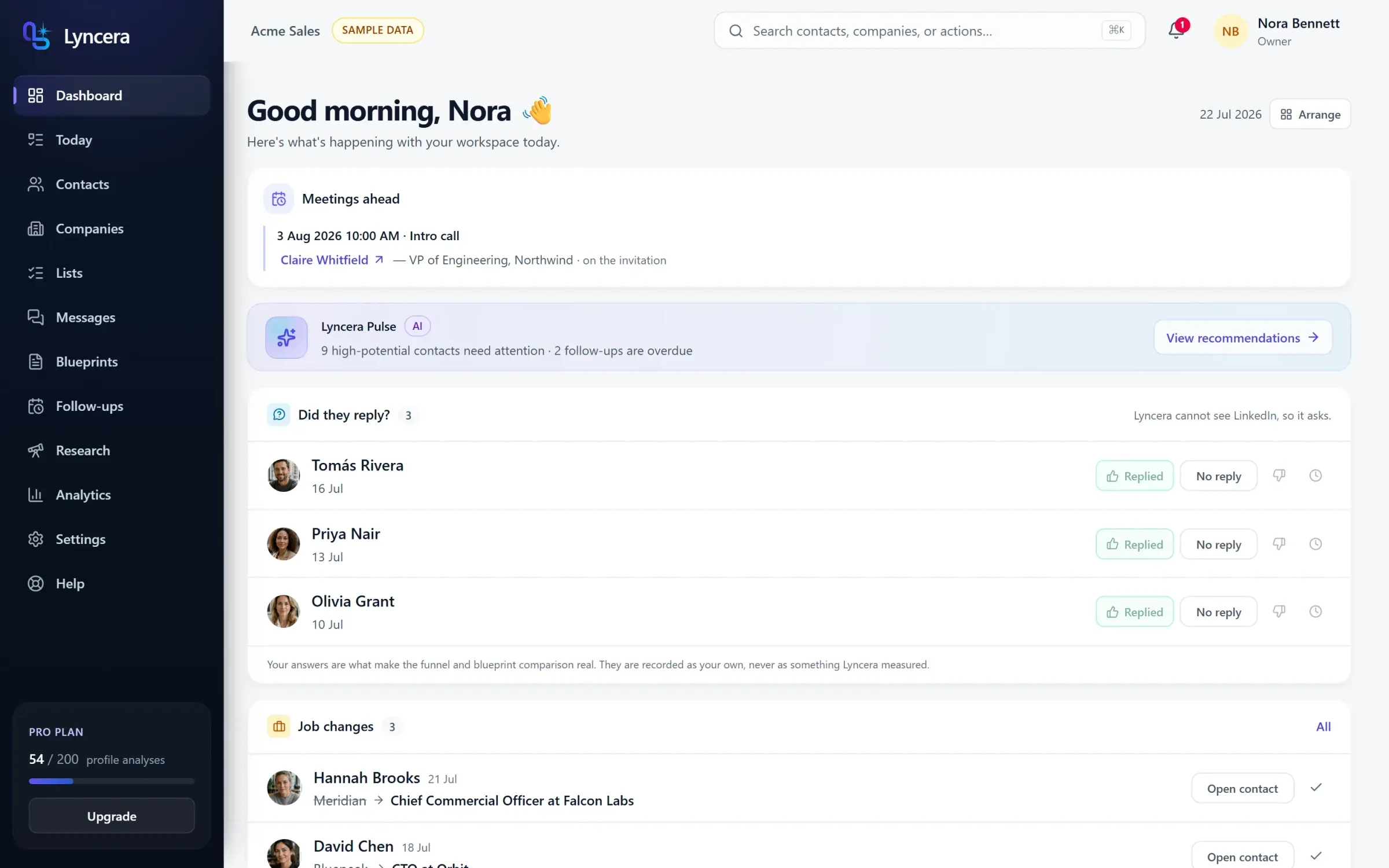
Every figure is counted from your own workspace
Lyncera will not show you a number it cannot stand behind.
- No open rates, no invented engagement: LinkedIn exposes neither
- Reply rates come from answers you gave, and say so on every surface
- Duplicate detection, a re-check queue and a data-health report keep records honest
- API keys, webhooks, CSV in and out, and shared segments for the team
Data and numbers
The whole desk, not just the moment of discovery
Finding somebody worth an hour takes a minute. Everything after it is what decides whether the hour turns into a conversation — so all of it is in the product, not on a roadmap.
Capture
Getting a real record out of a page you are already reading.
- A side panel on the profile
- Reads the page you opened when you press the button, and not a moment before. Alt+L opens it without the mouse.
- Companies from a page or a link
- Name, industry, location, size and logo — read from the fact line rather than by position, so a tagline never lands in the industry field.
- CSV import with a mapping step
- Your columns, your delimiter, a preview of what will be written before a single row is.
- Work history and skills, dated
- Stored as structured rows with start and end months. That is what makes role fit computable later without spending anything.
- Photos that keep working
- Copied into private storage, because LinkedIn's own image links expire within days and a broken avatar is a broken record.
- Duplicate detection and merge
- The same person arriving twice from two sources becomes one record, with both timelines kept and nothing silently dropped.
Decide
Whether this one is worth the hour, and why.
- A fit score out of 100
- Six components, each shown next to the field it was read from. The model supplies signals; code does the addition.
- Company fit, scored the same way
- From stated facts and observed signals, scored in code the same way — four components rather than the profile's six — not a vendor-wide model you are not allowed to inspect.
- Research with citations
- Public sources, each with a link you can open. When there is nothing to cite it fails loudly instead of writing something plausible.
- Role fit against an open role
- Computed in your browser from stored skills and tenure. It costs nothing, it cannot go stale, and it refuses to score a role that states no requirements.
- Smart segments
- Saved filters that live on the server, so everyone on the desk is looking at the same list and not their own copy of it.
- Bulk analysis
- Score a whole list in one pass, with the exact credit cost shown before it starts and refunded for anything that fails.
Reach out
A first message that reads as though a person wrote it.
- Three drafts, three angles
- Genuinely different openings, each built from something the profile actually says rather than three rewrites of one template.
- Blueprints that hold your structure
- You write the shape of the message once. The AI fills it from the person in front of it and leaves your structure alone.
- Proof points you wrote
- The claims in a draft come from a list you maintain. The model quotes them and never invents a new one.
- Phrases to avoid
- Words you never want in a first message are honoured on every draft, including regenerations.
- Versions and outcomes
- Every regeneration is kept, and the one you sent carries what happened to it. That is where a reply rate can honestly come from.
- Reply capture
- You paste back what came in. The timeline and every rate on the dashboard are built from that, and say so where they are shown.
Run the desk
The unglamorous half, which is the half that compounds.
- Follow-ups on a real calendar
- Month and week views, drag to reschedule, real durations, and an undo on every move you make.
- Subscribe from Google or Outlook
- A private iCal feed you can rotate at any time, so follow-ups appear beside your meetings instead of in a second tool.
- Today, as one ranked list
- Overdue first, then what closes on its own if you do nothing. It is a worklist, not a dashboard to admire.
- Job-change alerts
- A tracked contact moving to a new company reaches you the week it matters, when the message writes itself.
- A data-health report
- What is missing, what has gone stale, and what is worth fixing first — counted, not estimated.
- API keys and webhooks
- Scoped keys and outbound events, so what you build on top runs on your side of the LinkedIn boundary and stays there.
Twenty-four things, all shipped. None of this is behind a waitlist and none of it is an integration you have to buy separately.
The number
The score tells you when to walk away.
Most profiles are not worth an hour. Lyncera reads the one on your screen, weighs it against what you sell and who you sell to, and shows a fit score with the reasoning laid out. The time it saves is mostly in the people it tells you to skip.
Fit scoring is hybrid: the model produces signals, deterministic code computes the number. It never returns an unchecked total.
A score you can take apart
The model produces signals. Deterministic code turns them into the number, and the number is the sum of the parts you can see. Nothing rounds up in the dark.
Example breakdown
- ICP match24/30
- Role relevance16/20
- Company fit16/20
- Buying signals10/15
- Timing7/10
- Data confidence5/5
24 + 16 + 16 + 10 + 7 + 5 = 78. Always.
Messages that sound like you
Three genuinely different drafts, built from what the profile actually says and the way you told Lyncera you write.
Nothing gets dropped
Follow-ups land in your calendar. A tracked contact changing jobs reaches you the week it matters.
Numbers you can trust
Every figure is counted from your own workspace. Lyncera never shows an open rate it cannot measure.
Recruiting mode
If you place people, the whole thing changes shape
One answer at signup swaps the vocabulary. A profile stops being measured against an ideal customer and starts being measured against an open role — and the pipeline gets the stages a search actually has.
Roles carry their own requirements
Must-have and nice-to-have skills, a minimum number of years, seniority and location. Paste in a job description and the form fills itself.
Role fit is deterministic
Computed in your browser from stored skills and dated history. No credit, no cache, and it cannot be stale — because it is recalculated every time you look.
Three kinds of record, three filters
A candidate, a client and a hiring contact are not the same thing, do not belong in the same list, and are never counted together.
A timer for the ones you never contacted
You choose the days of silence, and until you do nothing expires at all — then an uncontacted candidate record goes, unless somebody is actually working it.
Two pipelines, one product
Sales
- New
- Researching
- Ready
- Contacted
- Replied
- Qualified
- Meeting
- Won
- Lost
Recruiting
- New
- Researching
- Ready
- Contacted
- Replied
- Screening
- Submitted
- Interviewing
- Offer
- Placed
- Lost
The first 5 stages are the same in both. These stages are read from the code that runs your workspace, not typed into a slide. Which set you see follows the answer you gave at signup.
The alternatives
Three ways to prospect on LinkedIn
Two of them are common, well funded, and carry a cost that is easy to miss until it lands. Here is the honest version of all three.
| Comparison | Automation tools | Data platforms | Lyncera |
|---|---|---|---|
| How it finds people | Search filters, then a queue that runs on its own | A database someone else assembled and resold | The profile you opened, because you decided it was interesting |
| What touches LinkedIn | It does, as you: connects, messages, views at scale | Enrichment calls and scraped snapshots | Nothing. It reads the page already rendered in your browser |
| What the score means | Usually none: volume is the strategy | A vendor-wide model you cannot inspect | Signals from this profile, totalled by code you can read the breakdown of |
| Whose account is at risk | Yours. Automation is against the platform's terms | Not yours, but the data provenance may be | Nobody's. There is no action attributed to your account |
| What it says when it does not know | Sends anyway | Returns a confident-looking blank | Refuses, names what is missing, and does not charge you |
| Who sends the message | The tool, on a schedule | Whatever you connect it to | You, from your own account, after reading it |
How it finds people
- Automation tools
- Search filters, then a queue that runs on its own
- Data platforms
- A database someone else assembled and resold
- Lyncera
- The profile you opened, because you decided it was interesting
What touches LinkedIn
- Automation tools
- It does, as you: connects, messages, views at scale
- Data platforms
- Enrichment calls and scraped snapshots
- Lyncera
- Nothing. It reads the page already rendered in your browser
What the score means
- Automation tools
- Usually none: volume is the strategy
- Data platforms
- A vendor-wide model you cannot inspect
- Lyncera
- Signals from this profile, totalled by code you can read the breakdown of
Whose account is at risk
- Automation tools
- Yours. Automation is against the platform's terms
- Data platforms
- Not yours, but the data provenance may be
- Lyncera
- Nobody's. There is no action attributed to your account
What it says when it does not know
- Automation tools
- Sends anyway
- Data platforms
- Returns a confident-looking blank
- Lyncera
- Refuses, names what is missing, and does not charge you
Who sends the message
- Automation tools
- The tool, on a schedule
- Data platforms
- Whatever you connect it to
- Lyncera
- You, from your own account, after reading it
Described as categories rather than named products: a competitor's feature list changes weekly, and a claim you can rebut is worth less than no claim. Every line in the Lyncera column is something you can check in the product.
Your existing stack
It fits where you already work
Four surfaces, all of them ones you already have open. Nothing here asks you to move your work into a new place and live there.
Chrome, on the page you opened
A Manifest V3 extension with a side panel. Pairing is a short code you approve in the web app — never a password you hand to an extension.
Your calendar, by subscription
A private iCal URL, rotatable on demand. Google Calendar, Outlook and Apple Calendar all show your follow-ups with the right duration.
Excel and Sheets, correctly
UTF-8 with a byte-order mark, CRLF endings, the delimiter your locale expects and a guard against formula injection. It opens without an import wizard, in any Excel.
Your own automation
Scoped API keys and outbound webhooks. Whatever you build sits on your side of the LinkedIn boundary, which is the only side there is.
Storage and access
Where your data lives, in plain terms
This is the section most tools write in legal language. Here is the short version, in the words the code would use.
- One workspace cannot see another
- Two paths in, and a lock on each: row-level security in Postgres for anything reading the database directly, and a workspace filter in every API handler. A test fails the build if a handler ever forgets its filter.
- Extracted fields, never raw HTML
- Name, headline, history, skills, location. The page itself is read in memory and discarded — there is no archive of LinkedIn on our disks.
- A retention window you set
- Records nobody ever acted on expire on your schedule. Anything actively being worked is exempt, so a timer never deletes live work.
- Every write is in the audit log
- Who changed what, when, and from which surface — and on a contact it is written by the same database function as the change itself, so those two cannot disagree.
- Export and deletion, on request
- A JSON export of your workspace whenever you want it, and a deletion request that actually deletes rather than hiding a row.
- Secrets never reach a browser
- The database service key, the payment keys and the AI key are server-only, and the build fails if one is imported into client or extension code.
The receipts
Built to be checked
- Fit scores are computed in code, not returned by a model
- Research fails loudly when it finds nothing to cite
- Every AI run is recorded with its real token cost
- Exports open in the right columns in any Excel locale
The line
It never touches LinkedIn on your behalf.
No background crawling, no automated connection requests, no scraping queues. Lyncera reads the page you opened, when you press the button. You copy the message and send it yourself — which is why your account is never the thing at risk.
Four things it will never do
- Send a connection request or a message for you
- Run a queue of profiles while you are asleep
- Store the raw HTML of a page it read
- Show you a number it cannot compute from your own data
Before you sign up
Questions worth asking first
Does Lyncera automate anything on LinkedIn?
No. No background crawling, no automated connection requests, no scraping queues, no message sending. It reads the page you opened when you press the button, and you copy and send the message yourself. That boundary is the design, not a limitation waiting to be lifted.
Is my LinkedIn account at risk?
Nothing acts as you. Lyncera never signs in to LinkedIn, never holds your LinkedIn credentials, and never performs an action attributed to your account. The extension reads the page already rendered in your browser.
What does it store about the people I look at?
Extracted fields: name, headline, role history, skills, location, plus a copy of the profile photo in private storage because the original link expires. Never raw page HTML. You can set a retention window and delete a record at any time.
Does it work for recruiting as well as sales?
Yes, and it is asked at signup. Turn recruiting on and you get open roles, candidate scoring from stored skills and tenure, recruiting pipeline stages, and a retention timer for candidates you never contacted.
Do I have to install the extension?
The web app works on its own: import contacts from CSV, add companies from a website link, research, score and draft. The extension is what turns a profile you are already reading into a record in one click.
What does the trial include?
Fourteen days, no credit card, and nothing is deleted when it ends. Every contact, message and note stays, and stays exportable. The workspace stops taking new records and the AI actions stop, until you choose a plan.
What does an AI action cost me?
Credits, reserved before the run and refunded automatically if it fails. Research, fit scoring and drafting spend them; role fit, segments, imports, follow-ups and the calendar never do, because none of those needs a model. The cost of a bulk run is shown before it starts.
Can a team share one workspace?
Yes. Shared lists, shared segments, shared templates and analytics rolled up across the desk. Every record belongs to the workspace, and row-level security plus a filter in every handler is what stops one workspace seeing another.
Does it work properly in other languages?
End to end: the app, the extension, the help centre and the CSV exports. A Finnish LinkedIn also fills an English workspace correctly, because the industry vocabulary is mapped both ways rather than stored as whatever the page happened to say.
What happens if the AI is unavailable?
It says so plainly and charges you nothing. Everything deterministic keeps working — role fit, segments, imports, duplicate detection, follow-ups, the calendar feed and every export — because none of it ever needed a model to run.
Start with the next profile you open.
A free trial, no credit card. The Chrome extension takes a minute to set up.
14 days free. No credit card. Nothing is deleted when it ends.